Home  > Microsoft Teams
Microsoft Teams

Microsoft Teamssafe

rating4.6
Rating
5.8M+
DOWNLOADS
1416/1.0.0.2026112702
Version
ADVERTISEMENT

Additional Info

App Name
App Name
Microsoft Teams
Developer
Developer
Microsoft Corporation
Rating
Rating
4.6
Package Name
Package Name
com.microsoft.teams
Version
Version
1416/1.0.0.2026112702
Updated
Updated
Jun 23, 2026
ADVERTISEMENT

Description

Microsoft Teams, as the hub for teamwork in Microsoft 365, is an all-in-one collaboration platform that combines chat, teams meetings, voice/video calls, file transfer capabilities and app integrations in a single workspace to keep people connected – whether they are at the office or working remotely outside (or across) organizations. Bringing together chat, audio and video calling, Teams has taken off since its launch in November 2016 with over 300 million monthly active users of the client which is now largely superseding previous Microsoft communication applications such as Skype for Business / Skype.

Microsoft Teams is more than a video conferencing tool; it is an integrated digital workplace transforming collaboration, communication and business processes into one secure extensible platform. It works especially well for organizations that are already integrated with the Microsoft 365 ecosystem.

Features

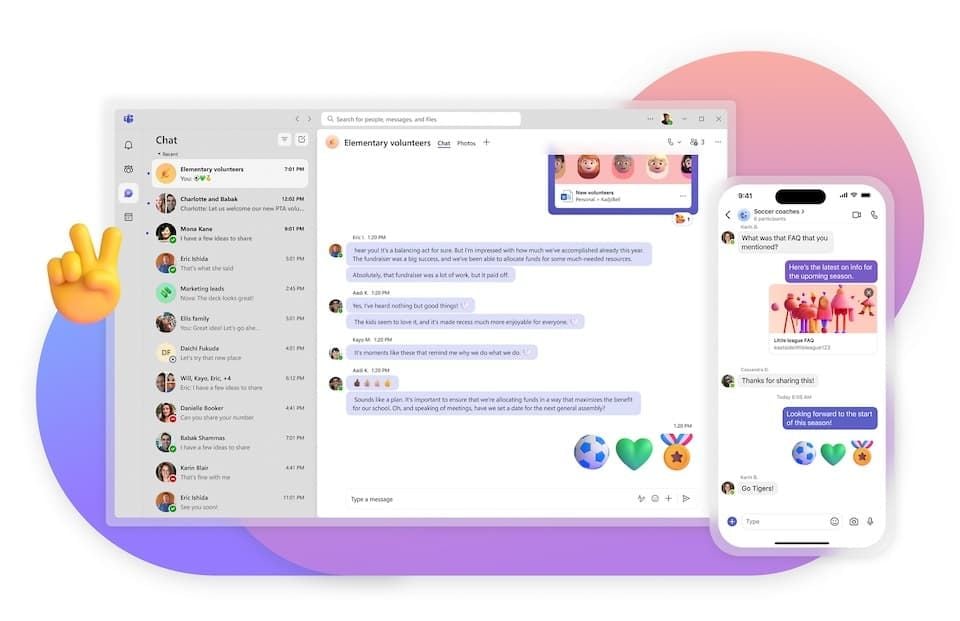
1. Chat & Messaging: One-on-one and group chat with text, emojis, GIFs stickers file sharing threaded conversations Add "chat with yourself" to keep personal notes.

2. Channels: Dedicated subjects inside a squad (projects, departments). Custom, private and shared channels support for flexible collaboration.

3. Audio & Video Meetings: HD video meetings (up to 10,000 participants for no cost and up-to 1,000 paid), webinars/live events support audiences of up to 20,000 viewers. Screen sharing, virtual backgrounds, Together Mode and real-time captions (30+ languages)

4. Teams Phone / Calling: PSTN calling, voicemail, call transfer and enterprise voice integrated. Make calls directly from chat or contacts

5. Microsoft 365 Integration: Integrate seamlessly with Word, Excel, PowerPoint, OneNote, SharePpoint & OneDrive as well Outlook and Planner which allows to co-working on the same project without switching applications.

Review

Microsoft Teams is an integrated collaboration hub that brings together chat, video meetings, file sharing and app integration all in one place. These target organizations of all sizes, from small businesses to large enterprises, and describe themselves as a "workspace for real-time collaboration & communication". It offers Windows, macOS and iOS apps as well as Android support (and web browser too) which makes its service usable on almost any given device.

I identified Teams to be high value especially in regards remote and hybrid work use cases. It "helps keep everyone on the same page, drives productivity and lowers email volume". Organized with channels for separate projects or departments allows ease of searching through messages.

What I find to be really exceptional is the tight integration with Microsoft 365. Everything is perfectly linked and in sync. Using Teams, I get direct access to Word, Excel, PowerPoint, Outlook through SharePoints and OneDrive — without having to go in an out of applications. This "makes workflows very efficient".

The quality of audio and video in calls is an area where it has proven consistent reliability. As one verified User put it, "great audio and video quality" The platform can still manage bandwidth effectively even with several participants.

For different projects, you might create new teams and channels to keep conversations focused / more easily searchable. I can find discussions weeks back due to the persistent chat feature thus nothing is lost.

Biggest drawback is that it can use as much as 1 GB of RAM on Windows systems when the app is sitting idle. The issue is even worse if there are meetings on machines with older hardware.

And for the optimal experience: keep Teams up-to-date, close channels and chats you don't use so that memory usage is less demanding; try not to miss important meetings while on Wi-Fi; discuss interface part with built-in tutorial.

Latest News

  • Microsoft Teams Transforms the Way Your Team Works
    Microsoft Teams Transforms the Way Your Team Works
    Read more

FAQ

1. What is Microsoft Teams and what can I get from it?

-

Microsoft Teams is "the best messaging application for your organization — a workspace for real-time collaboration and communication, meetings, file and app sharing". It includes chat, video calls, file storage and app integration into one platform to make remote collaboration seamless so you should use it.

2. Who is a Microsoft Teams user?

+

3. What is the difference between a team and channel?

+

4. How to reduce High memory consumption?

+

5. Can I see old chats and files in offline mode?

+
ADVERTISEMENT
Install Latest APKCheck historical versions

Ratings

4.6
Total 8.2M
5
4
3
2
1

Screenshots

screenshot-1
screenshot-2
screenshot-3
screenshot-4
screenshot-5
screenshot-6
prevnext